See Annova in action
A local tool to gather your bank statements and see it all, crystal clear.
Local. Encrypted. Offline.
Version 0.3.0 · macOS 10.13+ · Windows 10+
Rebuild your financial history from your bank statements, as far back as they go. All your accounts in one place.
Classify, categorize, organize by project. See your balances, flows and spending across your whole history.
Projections, planning, goals. The logical next step.
Sunburst view by category and subcategory. See where your money goes at a glance.
Balance computed across your full history, all accounts combined.
Create your vault, and your categories adapt to your profile.
Stored on your machine, in an encrypted file protected by your password.
Check if any periods are missing from your imports.
Credits, debits and net balance month by month. See your flows at a glance.
Link your accounts to people. Ideal for couples or families.
Markdown notes on your transactions, projects and wishlists.
Attach invoices, documents or photos to your transactions and projects.
Export your transactions to CSV anytime. Your data is yours.
Import scanned statements too, thanks to OCR (on macOS for now).
Filter your transactions by period, account, category or amount.
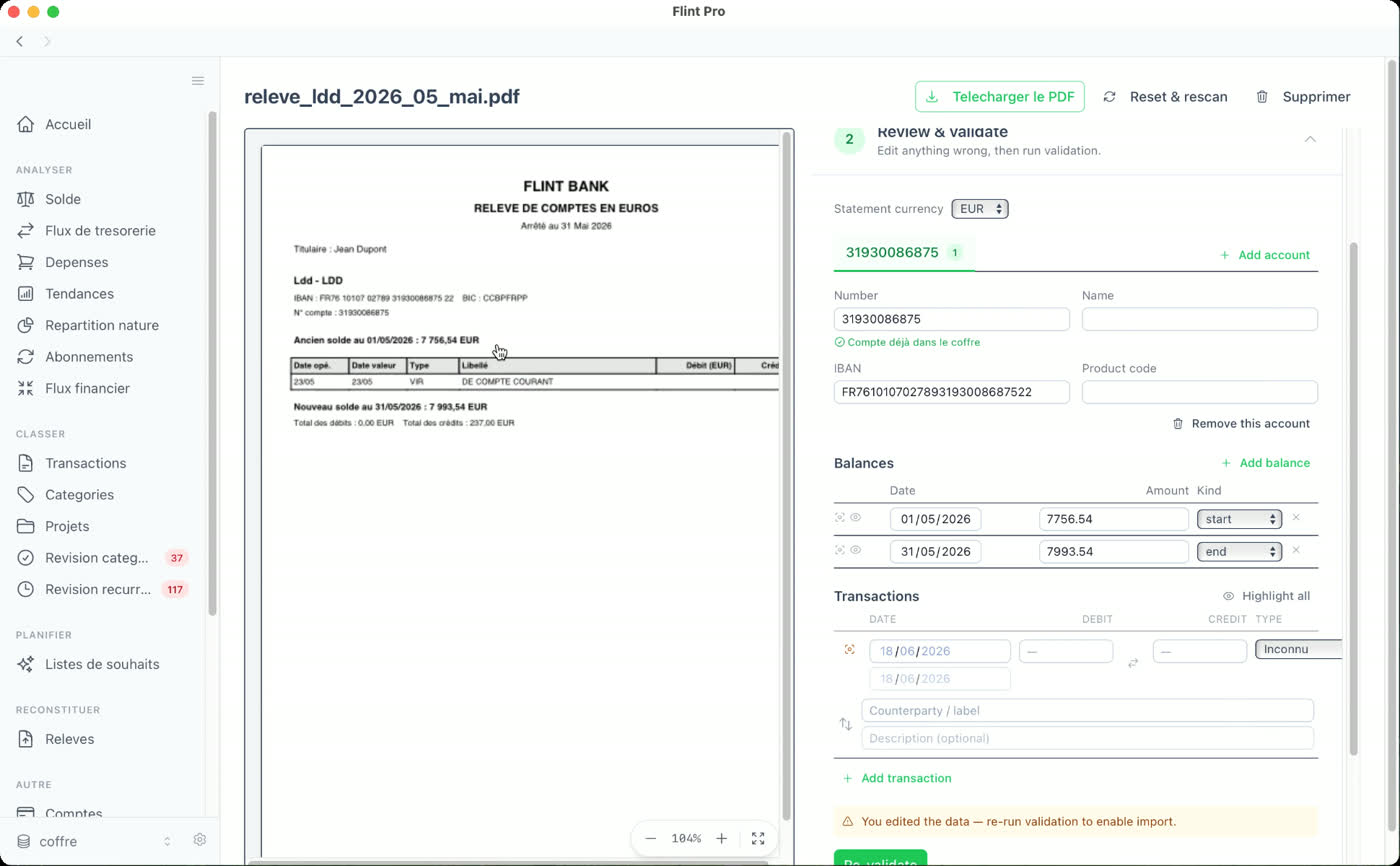
Select your PDF statements. The scanner extracts transactions automatically.
Automatic detection of similar transactions, with batch suggestions.
Evolution by category, month-over-month, year-over-year comparison.
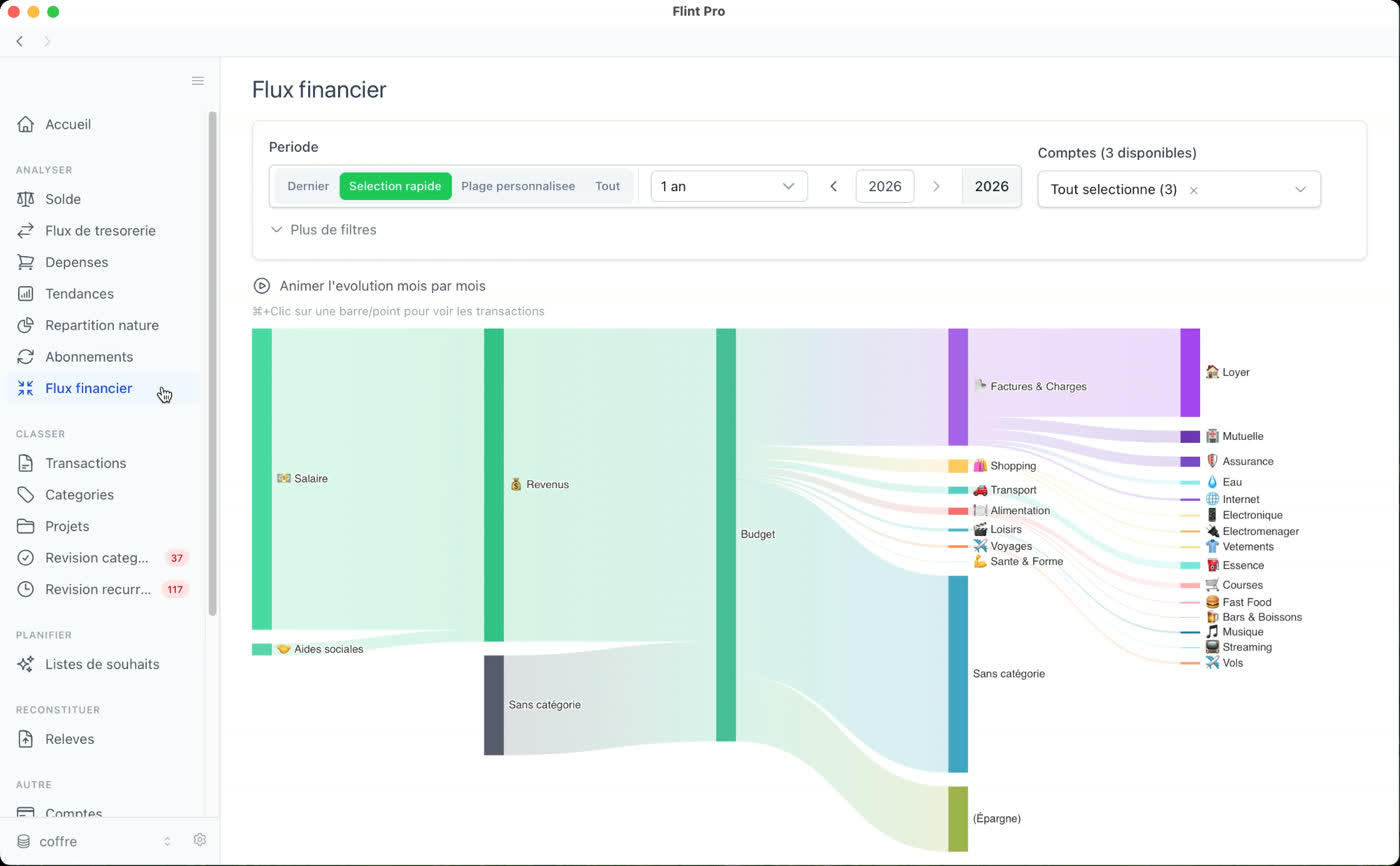
Sankey diagram: visualize income and expenses by category and subcategory. Identify your flows at a glance.
Every expense is obligatory, pleasure, or savings. Visualize the split.
Active, inactive, monthly/yearly cost, coverage timeline.
Separate vaults for you and people around you, instead of mixing everything.
Everything in Free, plus:
Annova is already useful day to day, but I want to build it with its users. Your feedback — on banks, imports, analytics — directly shapes what comes next.
No promised date. It's a side project I move forward in my spare time.
Annova stays free. The price of the Annova Pro License may rise as features are added — but your lifetime license is locked in.
No. No data ever leaves your computer. No server, no cloud, no account required. Everything is stored locally in an encrypted database (AES-256).
Your vault opens only with your password: no recovery key, no backdoor. If you lose the password, there is no way to recover it. Since your data is a local encrypted file, backing it up is up to you.
No, no cloud, no sync. Your vault is just a local file: back it up like any important file (Time Machine, external drive…).
Yes, 100%. Annova works entirely offline. No internet connection is needed, ever.
Only anonymous usage statistics (edition, version, OS, country), with no personal or financial data, and you can turn it off anytime in Settings.
There's no closed list. You select transactions directly on the statement PDF, whatever your bank. Scanned PDFs are supported on macOS.
Not for now. I'd rather start from sources that stay reliable and verifiable over time, like your bank statements, than hand-entered data that's often incomplete or inconsistent.
APIs do have one advantage: they give more recent data, more easily. But they often only go back a few months, break regularly and need maintenance. For long history — beyond two years — statements are the only reliable, stable source. Since the whole point is seeing the long run, that's the choice I made.
It's a monthly rhythm, yes. But see it as an appointment with yourself: a regular check-in to take stock and see where you stand. Statements usually arrive on the same day each month, an easy habit to build.
Just import the new bank's statements. All your accounts live in one place, and your whole history stays there.
If a PDF doesn't read cleanly, you select the lines by hand, or retry. Nothing is half-saved.
macOS (10.13 High Sierra or later) and Windows (10 or later). Annova is built with Tauri (Rust), making it lightweight and fast.
Yes. Annova is available on Windows 10 or later (.msi installer), exactly like on macOS. Just one difference today: OCR for scanned PDFs is only supported on macOS. Everything else is identical. A Pro license works on both systems.
Because the app is young and not widely known yet, macOS (Gatekeeper) or Windows (SmartScreen) may show a warning on first launch. On macOS: right-click the app and choose "Open". On Windows: "More info" then "Run anyway". Everything stays local, nothing installs in the background.
Because everything is local: no cloud, so no web app. And working across years of data suits the desktop better. A mobile version may come later, but the core will stay local.
You classify your transactions by hand, in batches when several look alike. You decide, no black box. Automation is available with Pro.
Yes. Accounts are unlimited, and you can link them to people. Ideal for a couple or a family.
Yes. You can delete an import, delete an entire account, or wipe all your data and start fresh. No lock-in.
A lifetime license, no subscription, activatable on up to 3 machines. The same key works on macOS and Windows.
No second download: Pro activates inside the app you already have. Buy a license from this page, you get a key by email, paste it into the app to unlock the Pro features.
Version 0.3.0 · macOS 10.13+ · Windows 10+